Friday, July 29, 2016
Technofied Lesson Plan
This is my TLP! I incorporated the links to the two demonstrations of the use of technology in the presentation. I'm so glad to have learned about google slides; they make presenting things so much easier.

I made a video!
Making my first video was a little difficult. I kept having difficulty finding a program that would install correctly. In the end, I just used Windows Movie Maker, and I wish I would have used it from the beginning! It was so intuitive and everything went very smoothly. I'm very grateful to have had the experience. Editing was a little more difficult than I thought it would be. There were some shots I really wanted to keep but had to cut because of time or placement.
Learn
from Nature Video Project!
Purpose: The
purpose of this assignment is to allow students the opportunity to
explore using video to relay information. Students will go to a local
park and take video of the surrounding landscape and flora.
Steps: First,
students, with the permission of parents, will explore a scene in
nature. It could be fun to do a class trip if funds allowed. After
enough video footage has been acquired, students must compile the
clips to form a cohesive visual of their journey. Students are
encourage to experiment with visual effects and music. They can also
narrate over the footage if they wish. Creativity is encouraged in
order for students to portray the feelings nature inspires. Students
are asked to either create a report, narrate over the video, or
somehow incorporate information about at least three species of
plants caught on camera.
Objectives:
The objectives of this assignment are to promote interest and
knowledge in video editing and nature.
Outcomes: The
ideal outcome of this project would be to have a movie day where
parents, staff, and students gather to watch each project and bond
over communal knowledge of native plants.
Nature Walk Evaluation
Rubric
(Excellent)
5...4...3...2...1...(Poor)
Subject
• has few grammatical errors
5....4....3....2....1
• is educational
5....4....3....2....1
• is age appropriate for a middle
school audience 5....4....3....2....1
• provides insight into nature
5....4....3....2....1
• is creatively presented
5....4....3....2....1
• lists at least three plants 5....4....3....2....1
Concept Score ______ out of 30
Content
• Presents video in a compelling
manner 5....4....3....2....1
• Presents information well
5....4....3....2....1
• Language is used effectively
5....4....3....2....1
• Images and/ or graphics relate well
to content 5....4....3....2....1
• Student(s) behave professionally
during the editing process 5....4....3....2....1
• Student(s) demonstrate thoughtful
approach to subject 5....4....3....2....1
Content Score ______ out of 30
Technical Aspects
• Camera is stable, smooth movements
and pans 5....4....3....2....1
• Subject is framed well, images are
well composed 5....4....3....2....1
• Subject is lit and clearly visible
5....4....3....2....1
• Sound is clear and understandable
5....4....3....2....1
• Video flows well
5....4....3....2....1
• Titles are used effectively
5....4....3....2....1
• Transitions are used effectively
5....4....3....2....1
• Music and/or creative narration are
employed 5....4....3....2....1
Technical Score ______ out of 40
Total Score ______ Project Grade
______
Saturday, July 23, 2016
Interview Podcast
Audacity is lots of fun. Thanks, Jack for interviewing me and putting up with my rambling.
The ending music was "The Mercury Tale" by Jessica Kip

Wednesday, July 20, 2016
First Podcast!!
I had a lot of fun making my first pod cast. Both the document and podcast are in the folder at this address:
https://app.box.com/s/tahuhrl5us10pyqtk0aioy9fnflm5yr5

I think that the ocean sound effect in the background may have been a little much, and my outro definitely needs more work----but audacity was a LOT of fun to use.
https://app.box.com/s/tahuhrl5us10pyqtk0aioy9fnflm5yr5
I think that the ocean sound effect in the background may have been a little much, and my outro definitely needs more work----but audacity was a LOT of fun to use.
Monday, July 18, 2016
Google Earth Activity Idea
Traveling with the Homesteaders
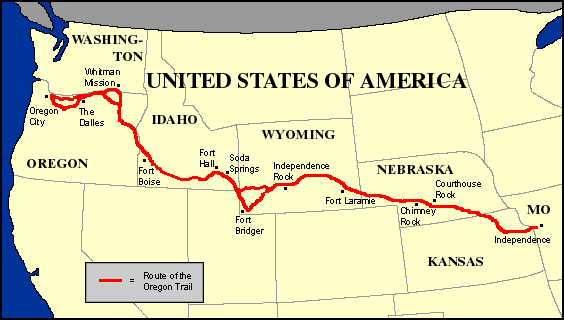
http://www.historyglobe.com/ot/maps/otmapmodern.gif
Playing Oregon Trail used to be the highlight of class for me. As a compliment the the game and the associated history lessons, I would like each student to make a Google Earth tour along the Oregon Trail. Each student would either create a family or research a historical one. Along specific trail sites, I would like a snapshot of the ground from Google Earth, along with a slide about what the student's family would be doing there.
My desired outcome for the assignment is for students to have a more personal connection to the Oregon Trail.
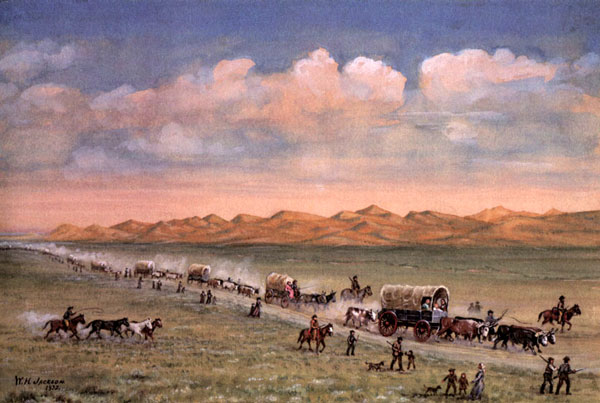
http://www.legendsofamerica.com/photos-oldwest/SandHillsOregonTrailWilliamHenryJackson.jpg

By researching the trail and what their hypothetical or historical family would be doing along it, my hope would be for students to gain a better appreciation of life on the frontier. The minimum requirements for this presentation would be that the student used Google Earth to make a tour of the Oregon Trail, and used snapshots of Google Earth images appropriately. Students would share their creations in front of class as a presentation. The class would be allowed to ask questions afterward. After all presentations were gone through, I would briefly overview the lesson and thank the students for their hard work.
Saturday, July 9, 2016

Subscribe to:
Posts (Atom)
Inspiration

Art can change the world.